
Beautiful Soup遍历文档树
一个Tag可能包含多个字符串或其它的Tag,这些都是这个Tag的子节点,BeautifulSoup提供了许多操作和遍历子节点的属性,BeautifulSoup中字符串节点不支持这些属性,因为字符串没有子节点。在本章中,我们晓得博客将为你介绍Beautiful Soup遍历文档树。
以下是我们的 html 文档 –
html_doc = """
<html><head><title>Beautiful Soup Tutorials</title></head>
<body>
<p class="title"><b>The Biggest Online Tutorials Library, It's all Free from pythonthree.com</b></p>
<p class="prog">Top 5 most used Programming Languages are:
<a href="https://www.example.com/java/java_overview.htm" class="prog" id="link1">Java</a>,
<a href="https://www.example.com/cprogramming/index.htm" class="prog" id="link2">C</a>,
<a href="https://www.example.com/python/index.htm" class="prog" id="link3">Python</a>,
<a href="https://www.example.com/javascript/javascript_overview.htm" class="prog" id="link4">JavaScript</a> and
<a href="https://www.example.com/ruby/index.htm" class="prog" id="link5">C</a>;
as per online survey.</p>
<p class="prog">Programming Languages</p>
"""

from bs4 import BeautifulSoup
soup = BeautifulSoup(html_doc, 'html.parser')
基于上述文档,我们将尝试带您了解Beautiful Soup遍历文档树。
推荐:使用 Beautiful Soup从HTML中提取JSON
子节点
Beautiful Soup遍历文档树 – 子节点,任何HTML文档中的重要元素之一是标签,它可能包含其他标签/字符串(标签的子元素)。BeautifulSoup提供了不同的方式来导航和迭代标签的子标签。
使用标签名称导航
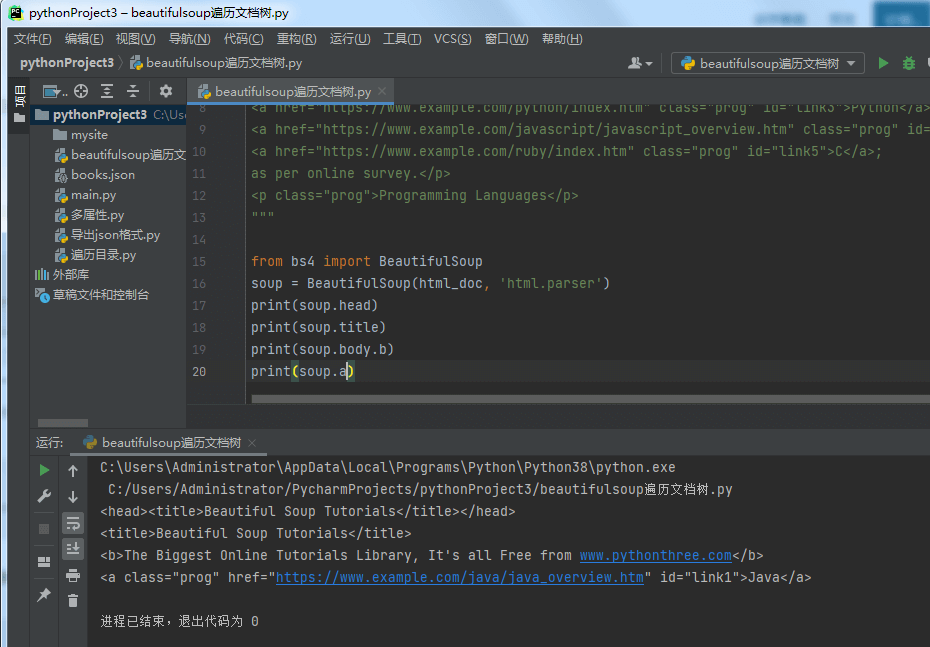
搜索解析树的最简单方法是按名称搜索标签。如果你想要 <head> 标签,使用soup.head –
soup.head
<head><title>Tutorials Point</title></head>
soup.title
<title>Tutorials Point</title>
在 <body> 标签中获取特定标签(如第一个 <b> 标签)。
>>> soup.body.b
<b>The Biggest Online Tutorials Library, It's all Free</b>
使用标签名称作为属性只会为您提供该名称的第一个标签 –
>>> soup.a
<a class="prog" href="https://www.tutorialspoint.com/java/java_overview.htm" id="link1">Java</a>
要获取所有标签的属性,您可以使用 find_all() 方法 –
>>> soup.find_all("a")
[<a class="prog" href="https://www.example.com/java/java_overview.htm" id="link1">Java</a>, <a class="prog" href="https://www.example.com/cprogramming/index.htm" id="link2">C</a>, <a class="prog" href="https://www.example.com/python/index.htm" id="link3">Python</a>, <a class="prog" href="https://www.example.com/javascript/javascript_overview.htm" id="link4">JavaScript</a>, <a class="prog" href="https://www.example.com/ruby/index.htm" id="link5">C</a>]
.contents 和 .children
我们可以通过其 .contents 在列表中搜索标签的孩子 –
>>> head_tag = soup.head
>>> head_tag
<head><title>Beautiful Soup Tutorials</title></head>
>>> Htag = soup.head
>>> Htag
<head><title>Beautiful Soup Tutorials</title></head>
>>>
>>> Htag.contents
[<title>Beautiful Soup Tutorials</title>
>>>
>>> Ttag = head_tag.contents[0]
>>> Ttag
<title>Beautiful Soup Tutorials</title>
>>> Ttag.contents
['Beautiful Soup Tutorials']
BeautifulSoup对象 本身有子对象。在这种情况下, <html> 标签是 BeautifulSoup对象 的子级 –
>>> len(soup.contents)
2
>>> soup.contents[1].name
'html'
字符串没有 .contents,因为它不能包含任何内容 –
>>> text = Ttag.contents[0]
>>> text.contents
self.__class__.__name__, attr))
AttributeError: 'NavigableString' object has no attribute 'contents'
不要将它们作为列表,而是使用 .children 生成器来访问标签的孩子 –
>>> for child in Ttag.children:
print(child)
Beautiful Soup Tutorials
. descendant
.descendants 属性允许您以递归方式遍历标签的所有子项 –
它的直接孩子和它的直接孩子的孩子等等 –
>>> for child in Htag.descendants:
print(child)
<title>Beautiful Soup Tutorials</title>
Beautiful Soup Tutorials
<head> 标签只有一个孩子,但它有两个后代:<title> 标签和 <title> 标签的孩子。Beautifulsou 对象 只有一个直接子对象(<html> 标签),但它有很多后代 –
>>> len(list(soup.children))
2
>>> len(list(soup.descendants))
33
.string
如果标签只有一个孩子,并且该孩子是 NavigableString,则孩子将作为 .string 提供 –
>>> Ttag.string
'Beautiful Soup Tutorials'
如果一个标签的唯一子标签是另一个标签,并且该标签有一个 .string,那么父标签被认为与其子标签具有相同的 .string –
>>> Htag.contents
[<title>Beautiful Soup Tutorials</title>]
>>>
>>> Htag.string
'Beautiful Soup Tutorials'
但是,如果一个标签包含不止一个东西,那么 .string 应该指代什么就不清楚了,所以 .string 被定义为 None –
>>> print(soup.html.string)
None
.strings 和 stripped_strings
如果标签中包含多个内容,您仍然可以只查看字符串。使用 .strings 生成器 –
>>> for string in soup.strings:
print(repr(string))
'\n'
'Beautiful Soup Tutorials'
'\n'
'\n'
"The Biggest Online Tutorials Library, It's all Free from pythonthree.com"
'\n'
'Top 5 most used Programming Languages are: \n'
'Java'
',\n'
'C'
',\n'
'Python'
',\n'
'JavaScript'
' and\n'
'C'
';\n \nas per online survey.'
'\n'
'Programming Languages'
'\n'
要删除多余的空格,请使用 .stripped_strings 生成器 –
>>> for string in soup.stripped_strings:
print(repr(string))
'Beautiful Soup Tutorials'
"The Biggest Online Tutorials Library, It's all Free from pythonthree.com
"
'Top 5 most used Programming Languages are:'
'Java'
','
'C'
','
'Python'
','
'JavaScript'
'and'
'C'
';\n \nas per online survey.'
'Programming Languages'
父节点
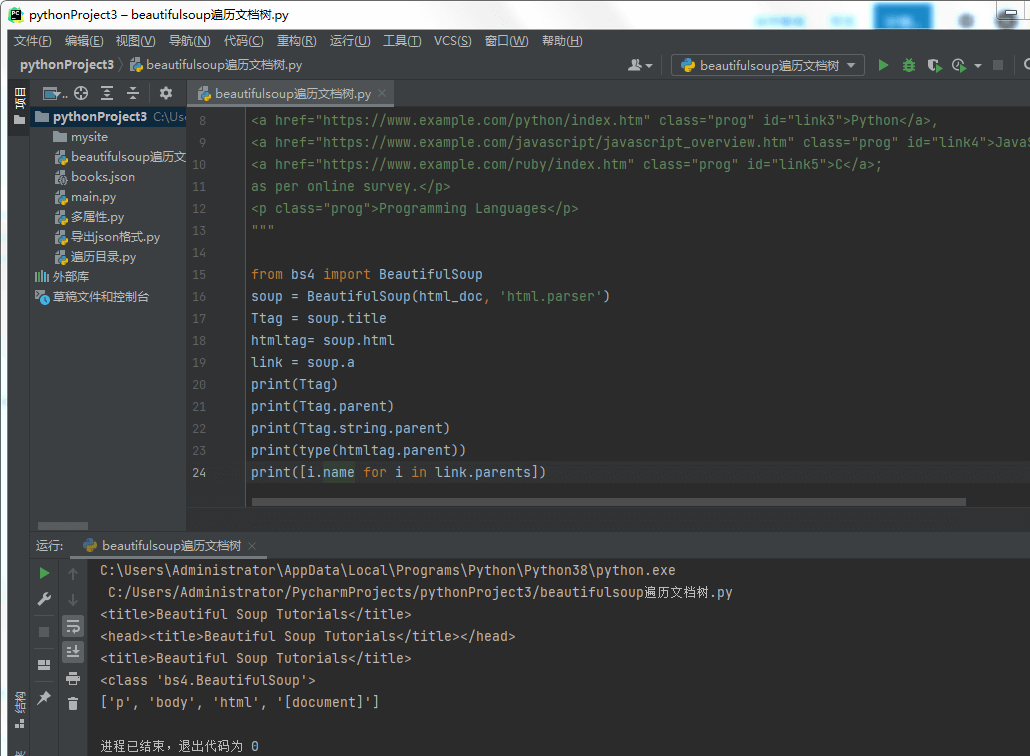
Beautiful Soup遍历文档树 – 父节点,在“family tree”类比中,每个标签和每个字符串都有一个父级:包含它的标签:
parent
要访问元素的父元素,请使用 .parent 属性。
>>> Ttag = soup.title
>>> Ttag
<title>Beautiful Soup Tutorials</title>
>>> Ttag.parent
<head>title>Beautiful Soup Tutorials</title></head>
在我们的 html_doc 中,标题字符串本身有一个父级:包含它的 <title> 标签 –
>>> Ttag.string.parent
<title>Beautiful Soup Tutorials</title>
像 <html> 这样的顶级标签的父级是 Beautifulsoup 对象本身 –
>>> htmltag = soup.html
>>> type(htmltag.parent)
<class 'bs4.BeautifulSoup'>
Beautifulsoup 对象的 .parent 被定义为 None –
>>> print(soup.parent)
None
.parents
要遍历所有父元素,请使用 .parents 属性。
>>> link = soup.a
>>> link
<a class="prog" href="www.example.com/java/java_overview.htm" id="link1">Java</a>
>>>
>>> for parent in link.parents:
if parent is None:
print(parent)
else:
print(parent.name)
p
body
html
[document]
兄弟节点
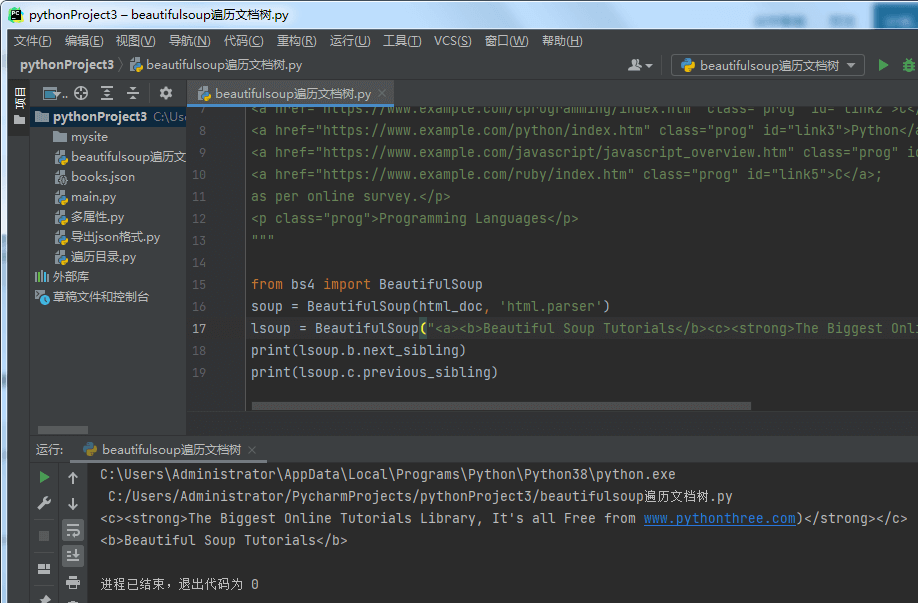
Beautiful Soup遍历文档树- 兄弟节点,以下是一份简单的文件 –
>>> sibling_soup = BeautifulSoup("<a><b>Beautiful Soup Tutorials</b><c><strong>The Biggest Online Tutorials Library, It's all Free from pythonthree.com,'html.parser')
>>> print(sibling_soup.prettify())
<html>
<body>
   <a>
      <b>
         Beautiful Soup Tutorials
      </b>
      <c>
         <strong>
            The Biggest Online Tutorials Library, It's all Free from pythonthree.com
         </strong>
      </c>
   </a>
</body>
</html>
在上面的文档中, <b> 和 <c> 标签处于同一级别,并且它们都是同一标签的子级。<b> 和 <c> 标签都是兄弟标签。
.next_sibling 和 .previous_sibling
使用 .next_sibling 和 .previous_sibling 在解析树相同级别的页面元素之间导航:
>>> sibling_soup.b.next_sibling
<c><strong>The Biggest Online Tutorials Library, It's all Free from pythonthree.com</strong></c>
>>>
>>> sibling_soup.c.previous_sibling
<b>Beautiful Soup Tutorials
</b>
<b> 标签有 .next_sibling 但没有 .previous_sibling,因为在树的同一级别上 <b> 标签之前没有任何东西,<c> 标签也是如此。
>>> print(sibling_soup.b.previous_sibling)
None
>>> print(sibling_soup.c.next_sibling)
None
这两个字符串不是兄弟,因为它们没有相同的父级。
>>> sibling_soup.b.string
'Beautiful Soup Tutorials'
>>>
>>> print(sibling_soup.b.string.next_sibling)
None
.next_siblings 和 .previous_siblings
要遍历标签的兄弟姐妹,请使用 .next_siblings 和 .previous_siblings。
>>> for sibling in soup.a.next_siblings:
print(repr(sibling))
',\n'
<a class="prog" href="https://www.example.com/cprogramming/index.htm" id="link2">C</a>
',\n'
>a class="prog" href="https://www.example.com/python/index.htm" id="link3">Python</a>
',\n'
<a class="prog" href="https://www.example.com/javascript/javascript_overview.htm" id="link4">JavaScript</a>
' and\n'
<a class="prog" href="https://www.example.com/ruby/index.htm"
id="link5">C</a>
';\n \nas per online survey.'
>>> for sibling in soup.find(id="link3").previous_siblings:
print(repr(sibling))
',\n'
<a class="prog" href="https://www.example.com/cprogramming/index.htm" id="link2">C</a>
',\n'
<a class="prog" href="https://www.example.com/java/java_overview.htm" id="link1">Java</a>
'Top 5 most used Programming Languages are: \n'
前进后退
Beautiful Soup遍历文档树 – 前进后退,现在让我们回到之前的 “html_doc ”示例中的前两行 –
<html><head><title>Beautiful Soup Tutorials</title></head>
<body>
<h4 class="tagLine"><b>The Biggest Online Tutorials Library, It's all Free from pythonthree.com</b></h4>
HTML 解析器将上述字符串转换为一系列事件,例如“打开 <html> 标签”、“打开 <head> 标签”、“打开 <title> 标签”、“添加字符串”、 “关闭 </title> 标签”、“关闭 </head> 标签”、“打开 <h4> 标签”等等。BeautifulSoup 提供了不同的方法来重建文档的初始解析。
.next_element 和 .previous_element
标签或字符串的 .next_element 属性指向之后立即解析的任何内容。有时它看起来类似于 .next_sibling,但它并不完全相同。下面是我们的“html_doc”示例文档中的最后一个 <a> 标签。
>>> last_a_tag = soup.find("a", id="link5")
>>> last_a_tag
<a class="prog" href="https://www.example.com/ruby/index.htm" id="link5">C</a>
>>> last_a_tag.next_sibling
';\n \nas per online survey.'
然而,那个 <a> 标签的 .next_element,紧跟在 <a> 标签之后解析的东西,不是该句子的其余部分:它是单词“C”:
>>> last_a_tag.next_element
'C'
上述行为是因为在原始标记中,字母“C”出现在该分号之前。解析器遇到一个 <a> 标签,然后是字母“C”,然后是结束 </a> 标签,然后是分号和句子的其余部分。分号与 <a> 标记处于同一级别,但首先遇到的是字母“C”。
.previous_element 属性与 .next_element 完全相反。它指向在此元素之前解析的任何元素。
>>> last_a_tag.previous_element
' and\n'
>>>
>>> last_a_tag.previous_element.next_element
<a class="prog" href="https://www.example.com/ruby/index.htm" id="link5">C</a>
.next_elements 和 .previous_elements
我们使用这些迭代器向前和向后移动到一个元素。
>>> for element in last_a_tag.next_e lements:
print(repr(element))
'C'
';\n \nas per online survey.'
'\n'
<p class="prog">Programming Languages</p>
'Programming Languages'
'\n'
总结
以上是晓得博客为你介绍的Beautiful Soup遍历文档树的全部内容, 希望对你的BeautifulSoup学习有所帮助,欢迎留言讨论。